
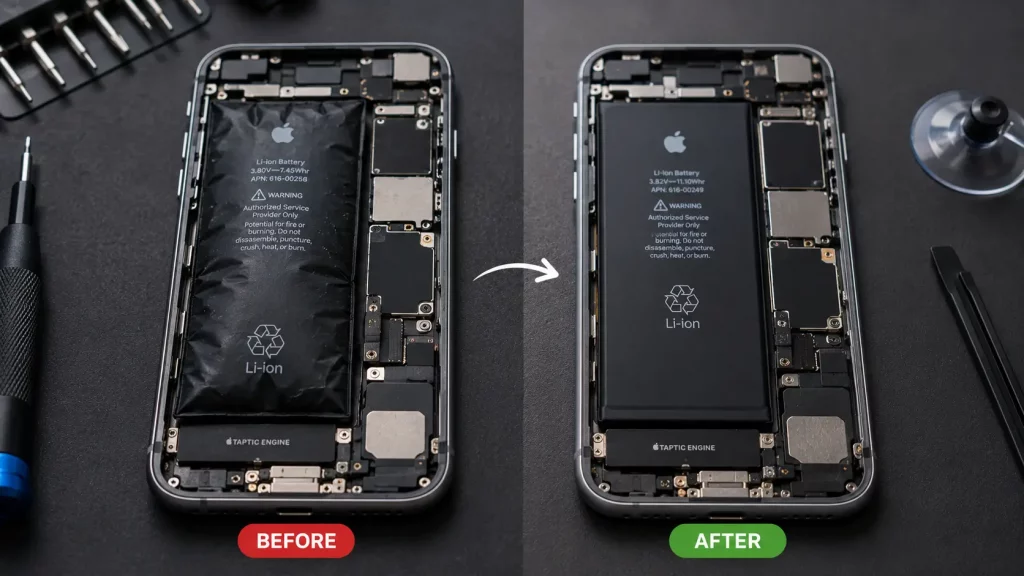
An iPhone battery replacement in the UK costs between £30 and £80 at an independent repair shop, or £49 to £129 at Apple, depending on your model. Older iPhones like the iPhone 8 and SE sit at the lower end. Newer models like the iPhone 16 Pro Max cost more.
A battery replacement is one of the cheapest ways to get more life out of a phone that still works well. If your iPhone dies by lunchtime, shuts down unexpectedly, or feels sluggish, a new battery is usually all it needs.
iPhone Battery Replacement Prices by Model
| iPhone Model | Independent Shop | Apple (Out of Warranty) |
|---|---|---|
| iPhone 6 / 6 Plus | £30 to £40 | No longer serviced |
| iPhone 7 / 7 Plus | £30 to £45 | No longer serviced |
| iPhone 8 / 8 Plus | £30 to £45 | No longer serviced |
| iPhone SE (2nd / 3rd gen) | £30 to £45 | £49 |
| iPhone X | £35 to £50 | £49 |
| iPhone XR / XS / XS Max | £35 to £50 | £49 |
| iPhone 11 | £35 to £55 | £49 |
| iPhone 11 Pro / Pro Max | £35 to £55 | £49 |
| iPhone 12 / 12 Mini | £35 to £55 | £49 |
| iPhone 12 Pro / Pro Max | £40 to £60 | £49 |
| iPhone 13 / 13 Mini | £40 to £60 | £49 |
| iPhone 13 Pro / Pro Max | £40 to £65 | £49 |
| iPhone 14 / 14 Plus | £45 to £65 | £105 |
| iPhone 14 Pro / Pro Max | £45 to £70 | £105 |
| iPhone 15 / 15 Plus | £50 to £70 | £105 |
| iPhone 15 Pro / Pro Max | £50 to £75 | £129 |
| iPhone 16 / 16 Plus | £55 to £75 | £105 |
| iPhone 16 Pro / Pro Max | £55 to £80 | £129 |
Note: Independent shop prices are typical UK ranges and may vary by location. Apple prices are from apple.com/uk for out of warranty repairs and may change. If you have AppleCare+ and your battery health is below 80%, Apple may replace it at no extra cost.
Why the Price Varies
The battery itself is not expensive. Most of the cost is labour and expertise. Here is what affects the price.
- Your iPhone model. Newer iPhones are harder to open. They use more adhesive, tighter screws, and more delicate ribbon cables. This makes the job slower and more complex, which pushes the price up slightly.
- Where you go. Apple charges a flat fee per model. Independent shops set their own prices based on parts cost, overheads, and location. Shops in London tend to charge more than shops in smaller towns. If you are not sure how to choose between shops, our guide on finding a phone repair shop you can trust covers exactly what to look for.
- Battery quality. Not all replacement batteries are the same. Cheap batteries from unknown sources may hold less charge, degrade faster, and in rare cases swell or overheat. A good repair shop uses quality cells that match the original battery’s capacity.
- Apple’s pricing structure. Apple recently raised the cost of battery replacements for iPhone 14 and newer models from £49 to £105 (or £129 for Pro Max models). This makes independent shops significantly cheaper for newer iPhones.
How to Check Your iPhone Battery Health
Before spending money on a replacement, check whether you actually need one.
Go to Settings > Battery > Battery Health and Charging. Look at the “Maximum Capacity” percentage.
- 90% to 100%: Your battery is healthy. No replacement needed.
- 80% to 89%: You will notice shorter battery life, but the phone still works fine. A replacement is optional. It depends on how much the shorter battery life bothers you.
- Below 80%: Apple considers this “degraded.” Your phone may throttle performance to protect the battery. A replacement is recommended.
- Below 70%: Your phone is probably shutting down unexpectedly, dying within a few hours, or struggling to hold a charge at all. Replace the battery as soon as you can.
If your iPhone shows a message saying “Your battery’s health is significantly degraded,” it is definitely time.
Signs You Need a Battery Replacement
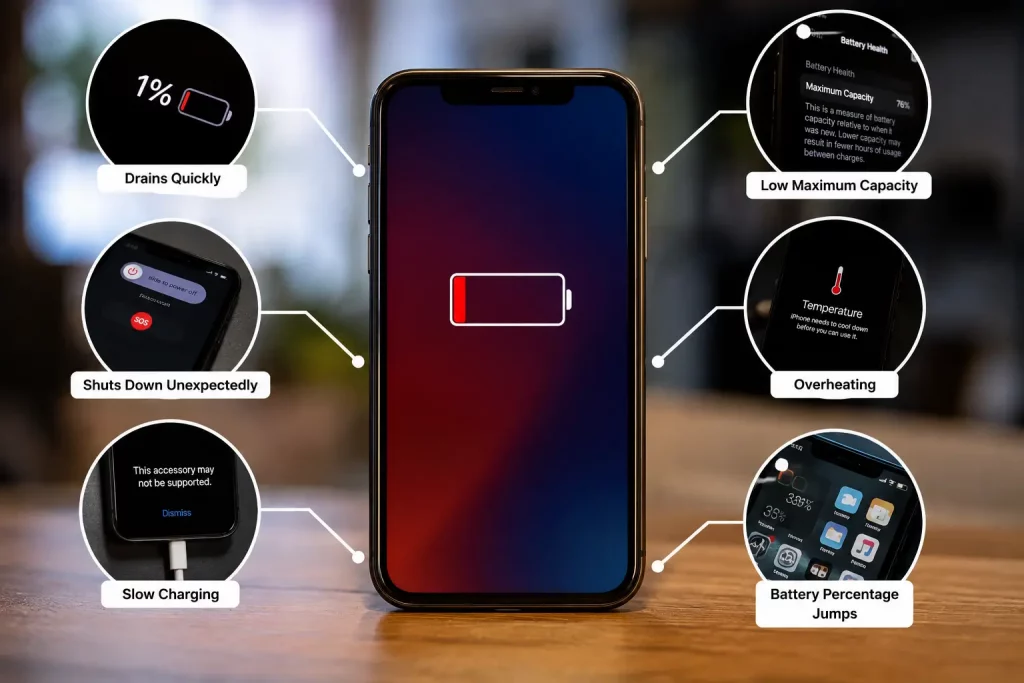
Battery health percentage is not the only indicator. These symptoms all point toward a dying battery.
Your phone dies long before it should, even with moderate use. The battery percentage drops quickly or jumps from one number to another (like 40% to 15% in a few minutes). Your phone shuts down unexpectedly, especially in cold weather. Cold temperatures drain batteries faster than normal, but if your phone is shutting down regularly, the battery itself is likely the problem. Our article on phone battery drain in cold weather explains why this happens. The phone feels unusually hot during normal use. It takes much longer to charge than it used to. The back of your phone is slightly bulging (this means the battery is swelling and needs replacing immediately for safety).
If you notice any swelling, stop using the phone and take it to a repair shop straight away. A swollen battery is a safety risk. If the swelling was caused by moisture getting inside the phone, our water damage repair guide covers what to do next.
How Long Does an iPhone Battery Replacement Take?
At an independent shop, most iPhone battery replacements take 20 to 40 minutes. You can wait in store and have your phone back the same day.
At Apple, walk in repairs at an Apple Store are usually same day. Postal repairs through Apple can take 5 to 7 working days.
At Phone Clinic, battery replacements are done while you wait. Walk into any of our 14 UK stores and we will have it done within the hour.
Is It Worth Replacing Your iPhone Battery?
Almost always, yes. A £40 to £70 battery replacement on a phone that still works well is far cheaper than buying a new iPhone.
Here is a simple way to decide.
Replace the battery if: Your iPhone is less than 4 years old. The battery health is below 80%. Everything else about the phone works fine (screen, camera, speakers, charging port). You are happy with the phone’s speed and features. The repair cost is less than 10% of the price of a new phone.
Consider upgrading instead if: Your iPhone is more than 5 years old. It no longer receives iOS updates. You have multiple issues beyond the battery (cracked screen, broken camera, charging problems). If the screen is also cracked, check our iPhone screen repair cost guide to see whether fixing both is still cheaper than a new phone. The phone feels slow even on a full charge.
For most people, a battery replacement buys another 2 to 3 years of use. That makes it one of the best value repairs you can get.
Does an iPhone Battery Replacement Affect My Data?
No. A battery replacement does not touch your storage, photos, messages, or apps. Everything stays exactly as it was.
We always recommend backing up to iCloud or a computer before any repair, just as a precaution. But your data is not at risk during a standard battery swap.
What Warranty Do You Get on a Battery Replacement?
At Apple, battery replacements come with a 90 day warranty (or the remainder of your AppleCare+ coverage).
At Phone Clinic, iPhone battery replacements come with a 12 month warranty. If the battery develops a fault within that period, bring it back to the same store and we will sort it out.
Not all independent shops offer a warranty on battery replacements, so always ask before you go ahead. A shop that does not guarantee its work is not worth using.
iPhone Battery Replacement vs DIY
You can buy battery replacement kits online for £15 to £40. They come with a battery, tools, and instructions.
We would not recommend this unless you are experienced with phone repairs. Replacing an iPhone battery involves removing the screen, disconnecting ribbon cables, and carefully prying out a battery that is glued to the frame. One slip and you can damage the screen connector, tear a cable, or puncture the battery (which can release toxic fumes or catch fire).
You also void your manufacturer warranty, lose your water resistance rating, and the replacement battery in a cheap kit may not match the quality of the original.
The £15 to £25 you save on a DIY repair is not worth the risk for most people.
Frequently Asked Questions
How much does an iPhone battery replacement cost in the UK?
Between £30 and £80 at an independent shop, or £49 to £129 at Apple, depending on your model. Independent shops are usually cheaper, especially for iPhone 14 and newer models where Apple now charges £105 or more.
How long does an iPhone battery replacement take?
20 to 40 minutes at an independent shop. You can usually wait in store. Apple Store walk ins are same day. Apple postal repairs take 5 to 7 working days.
How do I know if my iPhone needs a new battery?
Go to Settings > Battery > Battery Health. If the maximum capacity is below 80%, a replacement is recommended. Other signs include rapid battery drain, unexpected shutdowns, and the phone feeling unusually hot.
Is it worth replacing an iPhone battery or should I buy a new phone?
If your phone is under 4 years old and works well otherwise, replacing the battery is almost always worth it. A £40 to £70 repair is far cheaper than a new phone and can add 2 to 3 years of use.
Does replacing the battery make my iPhone faster?
It can. When battery health drops below 80%, iOS may throttle your phone’s performance to prevent shutdowns. A new battery removes this throttling, so your phone should feel faster again.
Will a battery replacement void my warranty?
If done by Apple or an Apple authorised provider, no. If done by an independent shop, Apple may say it affects your warranty. Under UK consumer law, using an independent repairer should not automatically void your statutory rights.
What is the cheapest iPhone battery to replace?
iPhone 6, 7, 8, and SE batteries are the cheapest, starting from around £30 at an independent shop.